
Zapier is a genuinely useful tool. If you need to automatically add a new spreadsheet row whenever someone fills out a form, or post a Slack message when a payment comes in, it handles that cleanly. You set up a trigger, define an action, and you are done in twenty minutes.
But real business workflows are rarely that clean. Inputs arrive as emails with inconsistent formatting. Data comes in as PDFs with varying layouts. Someone fills a free-text field in a way the Zap was not built to expect. And the moment any of that happens, the automation breaks - silently or with an unhelpful error message - and someone on your team is back to doing it manually.
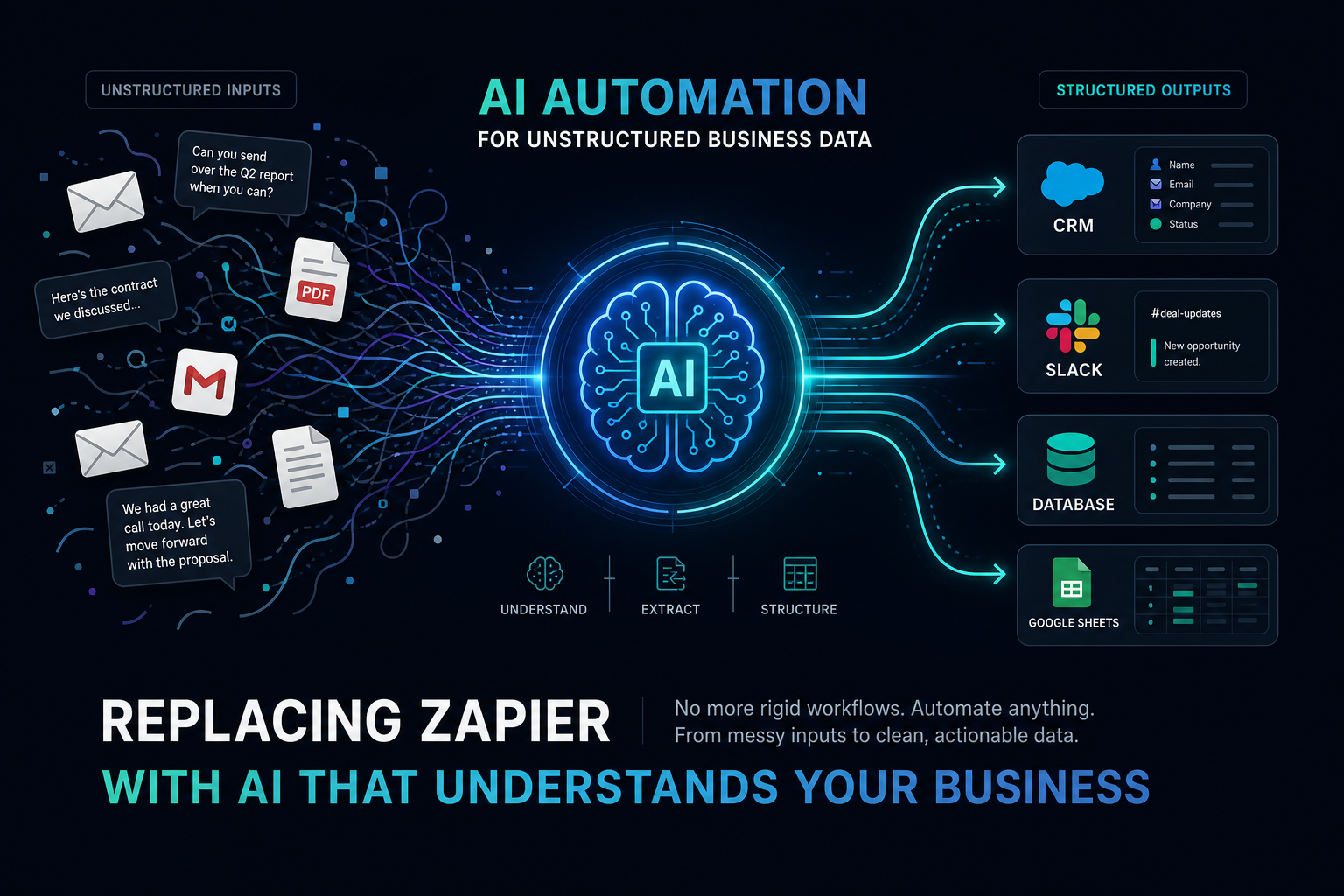
If you have hit this wall, you are not alone. Zapier-style automation was designed for structured, predictable data. The moment your workflow involves anything unstructured - emails, documents, or human-written text - you need something different. You need AI automation for business.
What Zapier Is Good At (and Where It Stops Working)
Zapier and tools like Make (formerly Integromat) are built on a trigger-action model. Something happens in one app, and a defined action fires in another. This works perfectly for simple, structured workflows:
- New Stripe payment → add row to Google Sheet
- New Typeform submission → create Trello card
- New calendar event → send Slack notification
These workflows work because the inputs are perfectly structured. Stripe always sends payment data in the same JSON format. Typeform fields always map to the same keys. There is no ambiguity - just data moving from A to B.
The trigger-action model breaks down when:
- The input is unstructured. An email body, a PDF, a voicemail transcript, a free-text comment - none of these have a fixed structure. Zapier has no way to understand what these mean; it can only look for exact text matches.
- Context matters. Two emails can contain the word “pricing” - one is a customer asking about your plans, the other is an internal cost discussion. Zapier cannot tell the difference.
- Edge cases exist. Every real-world process has exceptions. Someone submits a form in an unexpected format. An invoice PDF has a different layout than usual. Zapier requires you to build a separate Zap for every variation, and even then, something unexpected will eventually break it.
- Multi-step reasoning is needed. If your workflow requires making a judgement call - classifying something, extracting specific information, deciding who to route it to - Zapier cannot do that. It can only execute rules you define in advance.
This is not a criticism of Zapier. It is the right tool for the right job. The problem is that most business processes are messier than Zapier can handle.
The Unstructured Data Problem
Think about the actual work that happens in your business every day. A significant portion of it involves reading something - an email, a document, a message - understanding what it means, and taking an action based on that understanding.
That is not a niche edge case. That is most knowledge work.
Inbound emails rarely arrive in a predictable format. A new client enquiry might be a short three-line message, a detailed brief, or a forwarded email chain. No two look the same.
PDF invoices and contracts vary by vendor. Even for the same vendor, the layout might change, field positions might shift, or a one-off document might arrive with a completely different structure.
Support requests are written by customers in whatever words come to mind. They might describe the same problem five different ways. Routing them correctly requires understanding, not pattern matching.
Form submissions with free-text fields are another common failure point. If you ask someone to describe their request in their own words, you cannot predict what format that will take.
For all of these, you need something that can actually read and understand language - not just look for a value at a fixed position in a JSON object.
Real Examples Where Rule-Based Automation Breaks
Here are some concrete cases where businesses discover the limits of Zapier-style automation:
Invoice processing: A small business receives invoices from 30 different suppliers. Each supplier formats their PDF differently. Someone built a Zap to extract the invoice amount - it works for about 15 of them. The other 15 still need manual processing because the field position is not consistent. The automation created the illusion of solved work while leaving half the problem intact.
Lead routing: An agency takes inbound enquiries through a contact form. The “message” field is free text. They wanted to route leads based on the type of work described. Zapier could not classify free-text descriptions, so every enquiry goes to the same inbox and someone reads each one to route it manually.
Support ticket triage: A SaaS company receives hundreds of support tickets per week. They wanted to automatically categorise tickets as bugs, billing questions, or feature requests. Because the descriptions are unstructured, every attempt to build keyword-based Zaps resulted in frequent misclassifications and more manual work to correct errors than it saved.
Meeting note processing: After sales calls, a team wants to automatically extract action items, next steps, and deal stage updates from call notes. The notes are free-form text - different salespeople write very differently. No structured automation can reliably extract consistent information from inconsistent inputs.
What AI Automation Actually Does Differently
AI automation handles unstructured inputs by actually understanding them. Instead of looking for a value at a fixed position, it reads the document or message like a person would - understanding context, inferring intent, and extracting the right information regardless of format.
The core of an AI automation is a language model that sits between your trigger and your action. It takes whatever comes in, processes it intelligently, and produces a structured output that your other systems can work with.
A properly built AI automation for business can:
- Read and classify emails - understanding whether an inbound message is an enquiry, a complaint, a billing question, or a partnership request - and routing accordingly
- Extract structured data from PDFs - pulling supplier names, invoice amounts, due dates, and line items regardless of how the document is formatted
- Summarise and structure meeting notes - identifying action items, decisions, and follow-up tasks from free-form transcripts
- Score and qualify leads - reading a free-text description of a prospect’s needs and applying your own criteria to produce a structured assessment
- Classify support tickets - understanding what a customer is describing and routing to the right team, even when the same problem is described five different ways
The key difference from a rule-based tool is that the AI handles variation gracefully. If an invoice has a slightly different layout, the model still extracts the right data. If a customer describes a bug in unusual language, the triage still works. You are not building a Zap for every possible variation - you are building a system that can handle the variation itself.
The Automation Scenarios You Can Now Solve
With AI automation, the workflows that were previously impossible or unreliable become genuinely achievable:
Email triage and routing - inbound emails classified by intent and automatically directed to the right person or system, with a structured record created in your CRM.
Document data extraction - invoices, contracts, and intake forms processed automatically, with key fields extracted and written to your database without any manual re-entry.
Automated report generation - data pulled from multiple sources, synthesised, and delivered in a formatted report on a schedule, without anyone assembling it by hand.
Lead processing pipelines - enquiries read, enriched, scored against your criteria, and logged as structured records in your CRM - all without a person touching them.
Meeting intelligence - transcripts or notes turned into action item lists, deal updates, and follow-up tasks that go straight into the tools your team actually uses.
The important pattern is consistent: AI handles the unstructured step, while the surrounding workflow still needs rules, records, permissions, and a person for important decisions.
How to Know If You Need AI Automation
You probably need AI automation if any of these describe your business:
You have a manual process that takes hours each week, but the inputs are too messy for Zapier to handle. If someone on your team manually reads emails, PDFs, or form submissions before doing anything with them, that is a candidate for AI automation.
You tried to build an automation but it breaks on edge cases. If your Zap works 70% of the time and requires manual cleanup for the other 30%, you have a reliability problem that rule-based tools cannot solve.
Your automation relies on keyword matching. If you are currently using filter steps in Zapier based on exact text matches, you are one unusual submission away from a missed lead, a misrouted ticket, or a skipped invoice.
You have repetitive structured outputs but unstructured inputs. If the end state is always the same - a record in the CRM, a row in a spreadsheet, a ticket in your queue - but the inputs that feed it look different every time, AI automation is the right layer to add between them.
Choose Rules, AI, or Both
The safest design uses the least flexible tool that can complete each step.
| Step | Better fit |
|---|---|
| A form submission always creates the same record | Rule-based automation |
| An email must be classified by intent | AI |
| A required field is missing | Rule-based validation |
| A PDF layout varies by supplier | AI extraction followed by validation |
| A payment exceeds an approval limit | Rule-based approval gate |
| A person must judge an unusual exception | Human review |
Most useful systems combine all three:
- A rule starts the workflow.
- AI reads or classifies the unstructured input.
- Validation checks the required fields.
- A person reviews high-impact or uncertain cases.
- Rules update the record and notify the right people.
Ways to Build the Workflow
Extend your current automation platform
Zapier and Make both include AI features. This is the simplest option when the workflow already lives there and only one step needs language understanding.
Test the exact AI step, error path, and usage cost. Do not assume adding a model will fix a poorly defined process.
Use a technical workflow platform
n8n and code-based frameworks provide more control over models, tools, data, and hosting. They are a better fit when a technical team will own the workflow in production.
Use an AI operations workspace
Appaca combines internal apps, a shared database, integrations, knowledge, scheduled work, and AI coworkers. It fits teams that need a working interface and data model around the automation, not only a sequence of background steps.
For example, an invoice workflow can include:
- An inbox or upload trigger
- AI extraction from the document
- Required-field and duplicate checks
- A review queue in an internal app
- A person approving exceptions
- A database record and audit history
- A notification or accounting hand-off
A Practical Build Checklist
Before launch, define:
- The trigger
- The approved inputs
- The required output fields
- The confidence or validation rules
- The actions AI may take
- The actions that require approval
- The system of record
- The error queue
- The owner of failed runs
- The test examples and success target
Start with 20 to 30 real examples, including messy ones. Measure extraction accuracy, routing accuracy, human correction, failures, time, and cost.
Run the workflow beside the current process until the team trusts it. Keep the person who owns the process involved in the tests.
When Zapier Is Still Enough
Keep Zapier or another rule-based tool when:
- Inputs are structured
- The path is predictable
- Every condition can be written clearly
- Failures are visible and easy to retry
- AI would add uncertainty without adding value
The goal is not to replace Zapier. It is to use AI only where understanding is required and keep dependable rules everywhere else.
Getting Started
Choose one workflow where someone repeatedly reads, classifies, extracts, routes, or summarises information. Map the inputs, decisions, outputs, and exceptions.
Then build the smallest reliable version. Give AI one clear job, validate its output, and keep a person in control of high-impact actions.
Build an AI workflow in Appaca or compare no-code AI agent builders before choosing the platform.