
Docs and notes, right next to your apps
Write process docs, SOPs, and reference material in a fast block editor with slash commands, checklists, and rich formatting, autosaved and shared with your whole team.
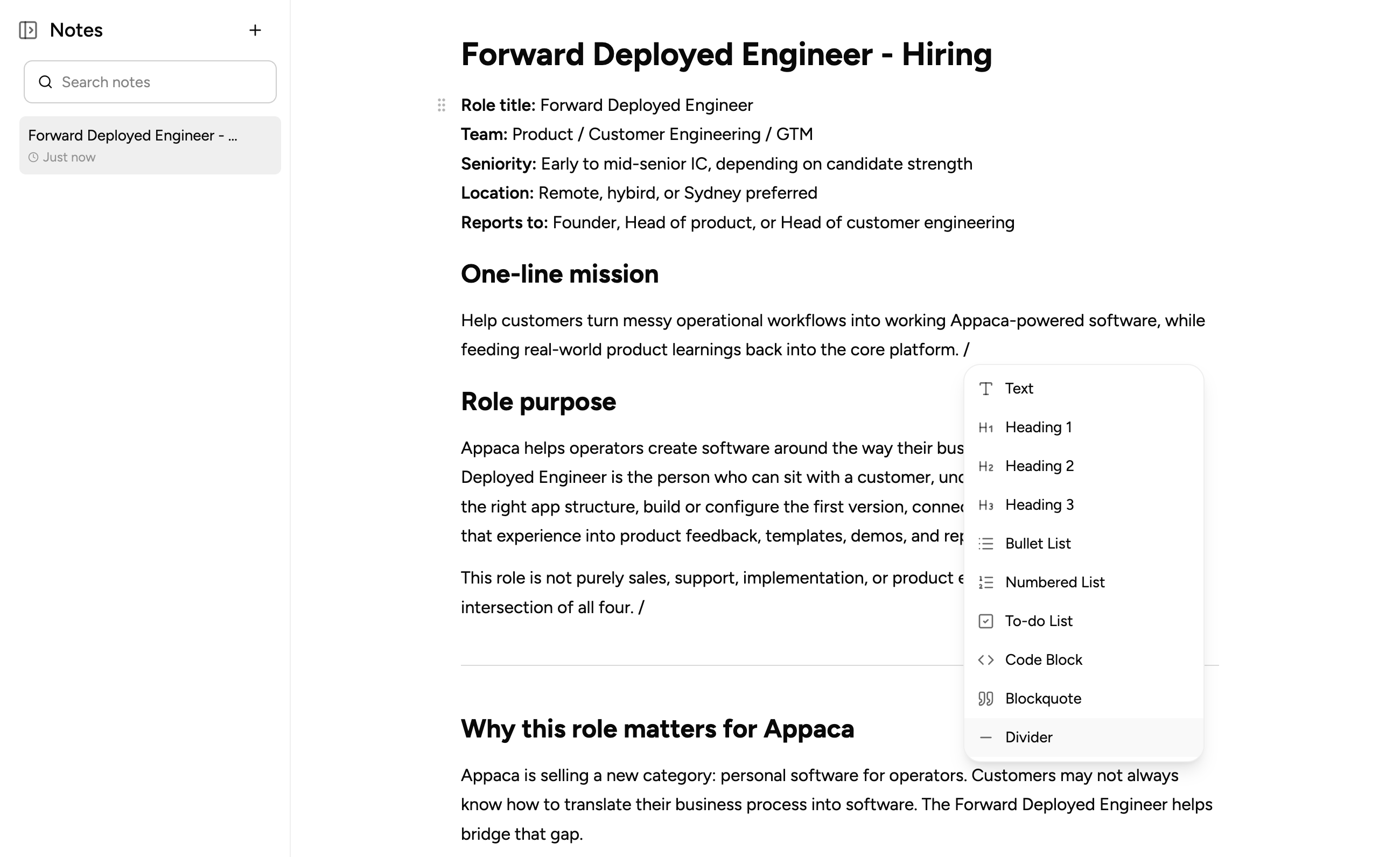
A notes editor that gets out of your way
Notes in Appaca are built for writing fast, not clicking through menus, and every note stays connected to the workspace your team already works in.
Type '/' for instant formatting
Press '/' anywhere in a note to insert headings, bullet or numbered lists, checklists, code blocks, blockquotes, or a divider, without leaving the keyboard.
Format as you type
Select any text to bring up a floating toolbar for bold, italic, strikethrough, inline code, links, and highlights, plus one-click headings.
Give every note an identity
Add a custom title and an emoji icon to each note, so your team can spot the right doc at a glance in the sidebar.
Autosave you can see
Every change to the title or content saves itself in the background, with a live status indicator confirming your work is saved. No save button, ever.
Find any note fast
Search the sidebar by title to filter your notes instantly, sorted by whichever was updated most recently.
Shared with your whole team
Notes live in your Appaca workspace, so every note you open shows up in your recent items and in workspace-wide search, right alongside your apps, chats, and coworkers.
Notes built on a platform your team can trust
Authentication, workspace access, and security are all built in, so your team can start writing without setting up a separate wiki tool.
Secure team sign-in
Every team member signs in with their own account, so your notes are only ever seen by the people you invite to the workspace.
Every teammate, one workspace
Invite your team into the workspace and everyone with access can read, write, and organize the same set of notes together.
Always know what's current
Each note shows when it was last updated, and the ones you open land in your recent items, so it's easy to pick up right where you left off.
Lives right next to your data
Notes sit inside the same secure workspace as the apps and database your team already uses, with nothing separate to provision.
Enterprise-grade security
Your notes are handled with the security practices your team expects - encrypted, protected, and under your control at all times.
Access from anywhere
Notes live in the browser, so your team can read and write them from the office, home, or on the road.
Organize as you go
Custom titles, emoji icons, and a searchable sidebar keep even a large collection of notes easy to browse and keep tidy.
Find any note instantly
Filter the sidebar by title as you type, so jumping to the right doc never means scrolling through a long list.
FAQs
Notes live inside your Appaca workspace, right next to the apps and data they describe, so documentation stays connected to your operations.
Yes. Press '/' to insert headings, bullet or numbered lists, checklists, code blocks, blockquotes, or a divider, or select text to bring up a toolbar for bold, italic, strikethrough, links, and highlights.
Every note lives inside your Appaca workspace, so any teammate you invite can view and edit it. There's no separate wiki tool to set up or invite people to.
Yes. Notes save themselves as you type, and a status indicator shows you when your latest changes have been saved, so there's never a save button to remember.
Yes. Search the notes sidebar by title to filter instantly, and notes also show up in Appaca's workspace-wide search alongside your apps, chats, and coworkers.
Keep your team's knowledge in one place
Write the docs your team needs and keep them right next to the apps and data they describe. No code, no separate wiki.
- 7-day trial
- No credit card
- Cancel anytime